---
title: "Web service"
slug: "web-service"
updated: 2022-05-31T08:58:54Z
published: 2022-05-31T08:58:54Z
canonical: "help.pillir.io/web-service"
---
> ## Documentation Index
> Fetch the complete documentation index at: https://help.pillir.io/llms.txt
> Use this file to discover all available pages before exploring further.
# Web service
These are services provided to the 3rd party servers. They work in On-cloud and Plugin lanes. It consists of the **SOAP** and the **Rest** services. The web service is first configured in the **Administration**->**Integrations** tab by adding a [**New Adapter**](https://help.pillir.io/docs/integrations-plugins#adapters).
| Web Service Description | Web Service Block on Canvas |
| --- | --- |
| ### **SOAP:** - The user selects the adapter from the dropdown list and the username configured for the selection is displayed in the first oval box. The user then enters the corresponding password in the second oval box. - The user selects the **Method**(GET,PUT,POST,DELETE) from the dropdown list. - The user selects the **I****nput** and **O****utput** parameters. | 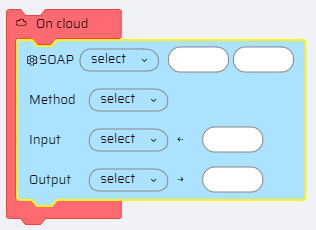 |
| ### **Rest Services:** - For Rest services, additionally the **UrI** is specified that provides access to retrieve data from the server. **Input:** <> <> <> **Output:** <> <> Note When the user hovers the mouse near the input or output parameter fields, the + icon for adding additional parameters are displayed. | 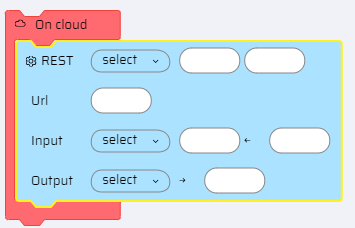 |